 PeacockMedia
Peep
File viewer / text encoding conversion utility for Mac
Screenshots
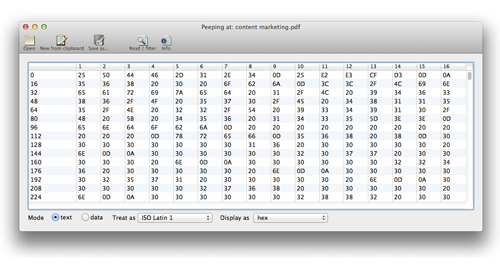
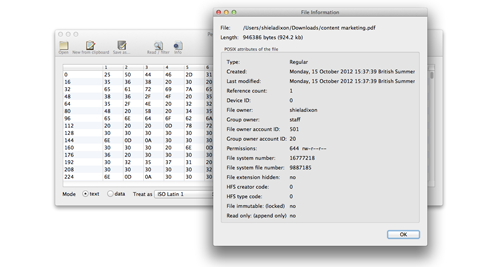
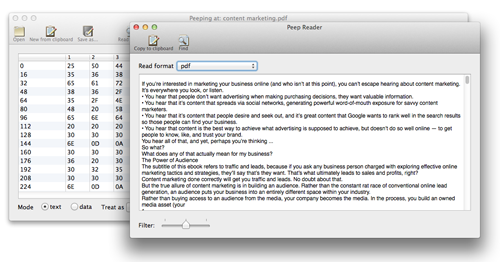
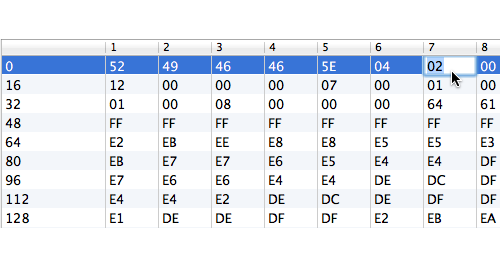


- View any file in detail, view / save in any text encoding
- Displays each byte as data (decimal or hex notation) or as text
- Can take text directly from the clipboard
- Try different text encodings to find the correct one or the best fit
- Attempts to filter the text from a proprietary format
- Saves a text file using the same or another encoding
Peep is a 'hexeditor'-style native OSX app with the emphasis on text encoding.
There are many different text encoding systems (ways of representing characters within a file) and a file doesn't necessarily know what encoding it's in. This can lead to frustrating problems when the file is opened, ie strange or foreign-looking characters.
Peep is useful when programming, when experiencing text encoding problems or when you need to extract information from a file that you can't open otherwise.
Allows you to view files in a 'hexeditor' style, inspect, access or sort out encoding problems and even edit individual bytes in hex, decimal or text.
Category:Developer Tools / Utillities
Support
If you have a problem or suggestion, please see Peep's help page for contact details.
System Requirements
Web download: Mac OS (OSX) 10.4 or higher, Intel or ppc. 10.8 (Mountain Lion) is supported
App Store: Mac OSX 10.5 or higher, Intel, Lion is supported
Version History
Version 2.3.5
released July 2020
small fix; last column of main table, which should show displayable characters, was truncated when a zero byte was encountered.
Version 2.3.4
released Sept 2018
small correction, reader view now correctly displays text in the appropriate system colour (white when in dark mode etc)
licensing policy change, gives free trial period
Version 2.3.3
released Sept 2018
Mojave dark-mode-ready
Links within the app and Release Notes updated to new secure website
Version 2.3.2
released Jan 2018
Policy change, previously Peep was a purchase on the App Store but free for web download with in-app purchase for the 'editable' feature. Now both App Store and direct download version have editing enabled and a small purchase price (with no in-app purchases and, for an experimental time, no trial period)
Small fix - when 'New from clipboard' is used, Window title now correctly reads "text from clipboard" rather than the name of the last file opened
Small fix - after 'New from clipboard' is used, the 'Show Info' button now correctly does nothing
Version 2.3.1
released Aug 2017
Adds column to the right of the individual bytes showing in a slightly more readable way, makes it easier to see what's happening as you try different text encodings. (As before, to copy some or all of the text, go to the 'reader' window.)
Version 2.3
released Oct 2014
Improved handling of 16-bit encodings in text mode
Allows editing of individual bytes, user may type data as text character, hex or decimal according to the display mode
Also allows input of a text string (the relevant number of following bytes will be replaced - note replaced, not inserted)
If user opens a 'file' which is actually a directory (eg an app or .rtfd) Peep opens that directory and allows user to select a file, rather than (as previously) alerting the user and giving instructions.
Version 2.2.2
released May 2014
More ways to open a file:
- drag the file onto the dock icon or application alias
- drag the file into the table in the main window
Improves auto-detection of the file encoding
Version 2.2.1
released October 2012
Displays all available POSIX information about the file in the info window
Adds toolbar to reader window
Moves reader's 'Find' button to the new toolbar
Fixes some niggles with the reader format / filtering
Version 2.2
released October 2012
Much better text extraction in Reader for certain file formats (rtf, pdf and html) by reading the format as well as filtering characters.
Adds 'Read format' button to reader window. (Automatically selected from file extension.)
Adds 'Open with default' button to toolbar - opens file in workspace using default application.
Version 2.1.1
released May 2012
Adds info button to toolbar for file info
Adds About box and help accessed through the Help menu
New application icon, more compatible with Aqua
From 2.1.1, two versions maintained, one built for distribution via web (10.4 - 10.7 supported) and one certified and built for distribution via App Store (10.5 to 10.latest supported).
Version 2.1
released April 2012
Adds customisable toolbar to main window
Adds Find button to reader window
No problems reported so Beta removed
Version 2.0 (Beta)
released March 2012
Rewrite using Obj-C
Adds data / text modes (see Readme for details)
Adds ability to choose input text encoding and output text encoding
Adds ability to save the file
Adds 'New from clipboard'